Google Learning Site
I feel familiar with using Google Sites for sharing UDL content. I think that it makes sense to reuse content each year so that we are not re-inventing the wheel. My current school tech Department site is:
I feel familiar with using Google Sites for sharing UDL content. I think that it makes sense to reuse content each year so that we are not re-inventing the wheel. My current school tech Department site is:
Here is a simple Google Form for students to sign-in to our online classes. The timestamp in the Responses Google Sheet will help show when they arrived. The form has a simple Yes/No option to upload work to be shared / reviewed. If they choose yes it progresses to the section with two ways of uploading, via G Drive or add a text share link.
I cannot embed this form here because it has an upload option.
The branching sections options based on the user's input (e.g. if they choose a particular radio button) has given me an idea to create a finite state automata like a choose your own adventure branching narrative. I have previously asked students to use Code.org App Lab to make these. But perhaps a Google Form could be easier. They could plan it with a LucidChart which could also to teach flow charts. I know this has been popular to do in Google Slides.
I found this video on Youtube: https://youtu.be/creCud8dbFk
I appreciate the slideshow still want to work through a range of Hapara Tutorials
Mymaps.google.com is very useful. Here is a drone flight map I made which has approximately the same info for safe drone flight, which I found using the AirShare app. I had to go through a process to allow the Mavic Air 2 drone to be able to fly within the school area (under Shielded Operation).
I thought the intro to sheets was quick and comprehensive. For my own analysis of student NCEA data I was given a good tip to try Google Data Studio. https://datastudio.google.com/
Super Spreadsheets 4 - share link

Blogging - Writing quality blog comments - Kerry
Ngā tākupu papai - Quaility blog comments - te reo
Uses standard HTML hyperlink tag structure:
<a href="insert URL here">Insert display text here</a>
What did I learn that increased my understanding of Manaiakalani kaupapa and pedagogy?

What did I learn that could improve my confidence, capability or workflow as a professional?
YouTube Playlists in Google Sites:
As a workflow I pick specific videos and tutorials to add to my Google Learning Site and arrange them, e.g. 2 columns, 3 columns or grid of 4 videos. This can be time-consuming so using Youtube Playlists would be potentially quicker. However, I like making the sequence of videos explicitly clear. I see that you can sort the order of the playlist by date, popularity etc, but there doesn't seem to be a bespoke option. E.g. I may wish to change the order to support proximal learning of topics.
What did I learn that could be used with my learners?
2D & 3D Planning
I think the basic shapes and drawing tools in Google Slides and Google Drawing will be useful for my Seniors who have to plan their 3D VR apps. This could be an easy way for them to pre-visual a bird's eye view of their 3D space.
Smart marking

What did I learn that could improve my confidence, capability or workflow in my personal life? I will revisit using Screencastify and editing with weVideo. I have previous experience with non-linear video with my degree in Digital Media. I am familiar with iMovie and Adobe CC apps. I do suffer from procrastination / perfection bias as I only want to publish polished videos to a high standard. Also it seems daft to reinvent the wheel if a professional Youtuber has already spent hundreds of hours creating an animated After Effects video on a topic. This inertia means I haven't yet created my series of self-published re-windable video tutorials ( like a Coursera or Udemy course). I think this would be a personal goal to create some high level original content
Ray and I reviewed two students' blogs and recorded our Google Meetups to post here. This isn't polished and is unedited.
Blogging - Embedding Video in Blogs: Makaore
Embedding a video in a blog (in te reo)
Time to reflect and share with colleagues
What did I learn that increased my understanding of Manaiakalani kaupapa and pedagogy? I had previously read the slide deck on Manaiakalani's history and background and I enjoyed speaking with Dorothy when she visited my school.
What did I learn that could improve my confidence, capability or workflow as a professional? Bookmarks / Tabs - nested folders to store them in folders when I have a class set of websites / portfolios - this would be handy rather than having to go back into Code.org dashboard to navigate between them. Also to group and catagorise.
What did I learn that could be used with my learners? Encouraged to use Hangouts to record rewindable learning content (rather than Screencastify / Loom)
What did I learn that could improve my confidence, capability or workflow in my personal life? On Wednesday morning I sat the Google Cert Ed Exam before school. I liked how the questions had interactive movable definition / answer and think I will try to make these as opposed to using Google Forms
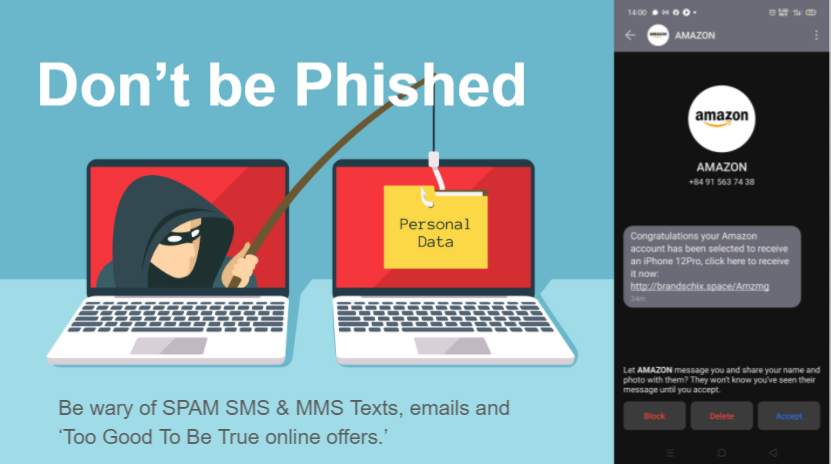
I have prepared a Google Slideshow on basic steps to protect yourself and your whanau with Cybersecurity to prevent you accounts being hacked. Check this out and update your passwords and setup 2FA today!
https://docs.google.com/presentation/d/17qLPgjkThCx1BWbw-yfk9bK7pTXWNTzaGhW96b5yQL0/edit?usp=sharing

If you want an entertaining look at the latest scams and hacks, listen in to the CyberWire Podcast: https://thecyberwire.com/podcasts
Whilst the names change to reflect new developments, the one thing that stays the same is you need to be a life long learner with a growth mindset.
https://sites.google.com/site/sbcwebsitedesign/
My Google site from St Bernard's seems very dated. I seems like a lifetime ago since I trialled Moodle and setup SBC with Google Education Suite as the Admin. They say One Internet Year = 10 years IRL and this website is cringe now because it's the old style (non-responsive) Google Site.
This blog itself is looking shabby because it hasn't been updated in a while, not since I completed the Post Grad Cert in Applied Practice (Digital & Collaborative Learning) with The Mind Lab by Unitec.
https://themindlab.com/digital-collaborative-learning/
I really enjoyed teaching & learning at The Mind Lab by Unitec with Matt & Malcom. It was a great experience learning about 3D printing, robotics and physical computing with Arduino. Since working for the Mind Lab I have been busy teaching at HVHS. Those five years were a wonderful experience. I learnt so much, both within my large department and with the pastoral teams.
https://sites.google.com/hvhs.school.nz/technology
This site is the product of many years work from the whole Technology Dept (with special kudos to my colleagues Bryan, John & Katie).
In moving to the West Coast recently, my challenge is to cherry pick the best bits and localise them to suit our community here. The aim is to grow a new Digital Technology Curriculum from the ground up. This brand new Technology Department Learning site is a work in progress.
https://sites.google.com/westlandhigh.school.nz/technology
https://sites.google.com/westlandhigh.school.nz/technology
I am going to update the WHS Computing Room with new equipment and am planning to introduce more 3D modelling and game development with Unity and Blender. We are currently exploring creating VR / AR (virtual and augmented reality) and robotics / drones (Microbit / LEGO / Tello) to teach Computational Thinking.
I am appreciating the opportunity to be a life long learner. For example the awesome DFI (Digital Fluency Intensive) course from Manaiakalani & Toki Pounamu Trust has some excellent links and resources. For example:
DFI Chrome Add-Ons and Extensions
This has many examples of Google Chrome Extensions and add-ons which will be really useful for many staff and I will be keen to share the knowledge to support our community of learning.
