Friday, September 24, 2021

DFI - Week 9 - accreditation


Accreditation opportunities

When I did PGCE Applied ICT & QTS teacher training in the UK I gained British Computing Society - ECDL (European Computer Driving Licence) Level 2 
BCS logo
ECDL logo

and Certiport's MOS (Microsoft Office Specialist) - Advanced Word, Excel, PowerPoint.


I paid the $10 fee myself at the start of this DFI course and have passed the Google Certified Educator Level 1, I am now looking at further accreditation. I found today's Opportunities slide deck interesting to see the other Educator certs available.

Deep Dive: External Recognition Opportunities

  1. Google Exam: An opportunity to gain a globally recognised award for teachers.

  2. Review content from the Google Training Centre Modules. 

  3. Apple Teacher Exams Apple Learning Centre

  4. Screencastify Master the Screencast

  5. WeVideo Education Ambassadors

  6. BookCreator Certified Author

  7. Hāpara Champion

Google Certified Educator Level 1

Google Cert Ed Level 1 logo


Level 2 passed

I expected the $25 exam to have practical scenarios and to be harder. I think the multiple choice / drag& drop questions would be harder for ESOL students because it was more about reading comprehension and catching the red herrings.
logo pending

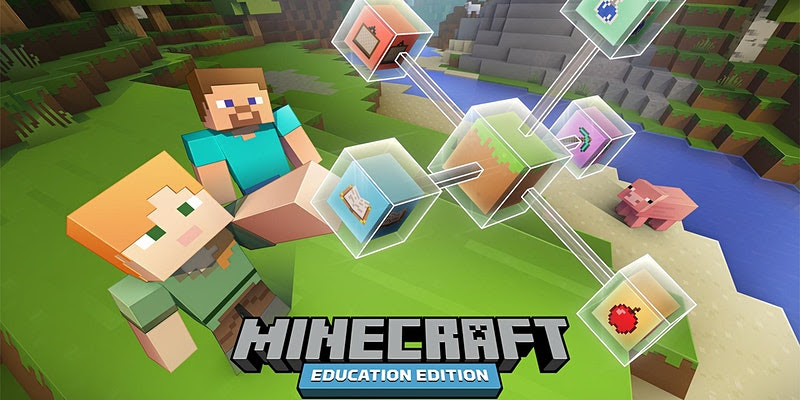
Microsoft Minecraft Edu PD


I have started to experiment with the delivery of Computational Thinking with Minecraft Edu. I've had a discusion with the HoD Maths to swap ideas on how I can integrate our DTEC CT curriculm so that it chimes in with the Y9 (measurement and number) and Y10 (statistics) maths topics. So I was pleased to see Cyclone is doing more PD with teachers for using Minecraft Edu. Here is a MinecraftEdu with maths for next Wed. We have an open evening hui at that time for senior subject selection, so hopefully they will share links to a webinar video / resources.

My initial thoughts are to integrate with our Droneblocks.io coding of Tello Drones to measure and calculate perimeter, area and volume (for Y9) and to use drone racing results bivariant data (for Y10 statistics). But the MinecraftEdu will be ideal for Y7-8 students.

CS Unplugged @ Home

I'm always impressed by the mahi of UC Computer Science Education with Tim Bell, so I was pleased to see today's tip of CSUnplugged@home. I will share this with our feeder school HPS's DTEC co-ordinator.

Friday, September 17, 2021

DFI - week 8 - Useful Blogger Tip - post from email


Kia ora,

thanks to Phil for the Blogger Tip to enable posting from email. This is a test. 

It's good to know that the 'post as draft' allows you to edit it for more features / functions.

Reflections on Scratch
I liked the intro to Scratch using OMGTech's 'Waka Wero'. I will use this with my Hangarau Matihiko class. For new teachers, it's worth remembering to remind students to 'verify email' so that they can share work.

--
Ngā mihi  / Kind regards.
--
Matt Harrison
Leader of Digital Technologies & Curriculum Development
BA Hons, PGCE Applied ICT, Post Grad.Cert Applied Practice (Digital & Collaborative Learning)

DFI - Week 8 - Computational Thinking - Edem626 - UC

CT Things that came up today


I appreciated the Future of Tech in NZ slideshow. I was aware of many of the ideas but found it refreshing and there were some good new examples of NZ Companies with innovative tech that will be relatable to my rural students.\
  1. Happy Cow Milk
  2. Halter $29m cowgorithm
We have started to use Trimble SketchUp For Schools (formerly Google SketchUp).
So it was interesting to see the Trimble work in Port Otago.


I was already familiar with the DTEC curriculum but the slideshow also had good Te Reo translations for Hangarau Matihiko Progress Outcomes terminologies.

Bucky shared some good links for game creation / character design


  1. Hiberworld which I thought was a nice 3D example of a template based game generator.
  2. HeroForge - looked like an interesting 3D character creator app

I shared the work of #Dan Milward & Gerard McManus - :  Te HikoTāraro

Dan Milward (working with Game Praxis) has also produced a Game Jam Cards - a game concept development card pack which makes for a creative group exercise. Here is a quick random generator app: http://ygd.bafta.org/resources/game-idea-generator 

I shared links to Drone coding https://sites.google.com/westlandhigh.school.nz/technology/new-dtec/9-10-computing/drones which uses Tello drones with https://learn.droneblocks.io/ for teaching & learning coding. The license cost US$500 could be shared between upto 10 teachers from a collection of schools.

I had registered for the Cyclone "Build Better Worlds" Minecraft Edu competition. I shared my learning site's Minecraft page: https://sites.google.com/westlandhigh.school.nz/technology/new-dtec/9-10-computing/minecraft-edu


Teachers Pay Teachers

I found these two resources are useful for CT with Minecraft Edu

ECE CT etc.

I thought the Cubetto looked cool and maybe my wife's early learning centre could get them, however, they are quite expensive and out of stock in Aus : https://www.primotoys.com/

Monday, September 6, 2021

DFI - Week 7 - Ubik Devices - DDDO - 3D VR & AR

Ubik - by Phillip K Dick

UBIK

In terms of ubiquitous apps for accessible and always on learning that is device agnostic, I have been using Aframe.io for students to code VR 3D spaces and 360 VR Tours. This can be used with any device that has internet access because it is an online IDE with links to Github called https://glitch.com/. It involves writing HTML with extra AFrame.io tags, such as <a-sphere>, which can be referenced from the documentation.

For differentiation I have introduced non-coders to CoSpaces.io/edu/ which is a proprietary block based visual IDE. To make /view the 3D work people can use a platform specific app for Android, iOS or on desktop/Chromebook they can login to the main website

3D for the Samsung - Solve for Tomorrow Competition

TinkerCAD Tiny House

My 7-8 STEM class has been designing 'tiny houses' to solve the housing crisis using TinkerCAD.com. Some have asked about using FloorPlanner.com which is a great way to visualise the interiors. They can easily drag and drop / move and resize walls, windows and furniture.

My 9-10 Computing class also has been trying to use Design Thinking to enter the competition. They have been working on SketchUp for Schools. SketchUp also has available furniture through the 3D Warehouse marketplace.

My 1213DTHM class has used TinkerCAD and MagicaVoxel (not suitable for Chromebook). Today, whilst looking for a Chromebook app to do 3D modelling and animation I stumbled across Vectary.com

This looks promising but has an expensive license if you want AR. So much so that it makes CoSpaces licenses seem affordable by comparison.


Here is something I tested and tried to export with iframe embed. Vectary charge more money for publishing publicly which is another negative. In comparison, CoSpaces does allow you to archive student work and move the licenses to a new cohort of students for Tech option rotation classes.


Digital Dig: bit.ly/DFIdigitaldig

My Slides:

Friday, September 3, 2021

DFI - Week 6 - Google Learning Sites Accessibility

Accessibility Poster
Accessibility Poster of DTEC Relevant Implications


Important info - Relevant Implications - Accessibility

This week has been about improving our Google Learning Sites. Apart from content and structure, Teachers, as part of UDL (Universal Design for Learning), need to understand web accessibility standards, for example having info / text inside images / banners without readable text / ALT tags. It is a NZ legal requirement for public buildings and webs sites to be accessible (e.g. ramps / lifts for wheelchair users in schools), however, we are blocking low vision users if text cannot be read aloud be screen readers. 

As a web designer, we stopped creating web buttons in Photoshop when we started using CSS 2.0. Apart from being less efficient, graphical text buttons hurt a website. This is due to the issue of SEO (search engine optimisation). Web spiders cannot crawl and parse text inside images. 

Teachers could be ignorant of the needs of low vision users perhaps thinking that they know their class students, however, we are trying to have visible learning for whanau - and so we need to accommodate the needs of elderly or vision impaired.

This is an NCEA requirement for Digital Technologies Levels 1-3. I've made a learning site page with Relevant Implications posters: https://sites.google.com/westlandhigh.school.nz/technology/new-dtec/12-13-dthm/implications

Two excellence Accessibility tips

Positives of Today

Lots of Good advice shared in the slideshow resources. Nice tip for teachers to use Google Drawing because I would have used Photoshop or Pixlr.com/e/ but using G. Drawing is more accessible for staff.

I was happy to share my site and resources because we all stand on the shoulders of others.

Today's Take Away

Personally thought it was a great tip to create Learning Site banners at W1000 x H 250 px. Learning Sites are responsive so the banner will sometimes crop when bigger. I tend to use them as a texture and then add text over the top. Setting them as 2000 x 500px produces a better non-pixelated result.

I also worked on improving the new topics. Since we are in lockdown I have had to change my plan from teaching Computational Thinking with Tello https://www.droneblocks.io to using Minecraft Edu on students Chromebooks.

Friday, August 27, 2021

DFI - Week 5 - UDL multi-modal

 Google Learning Site

I feel familiar with using Google Sites for sharing UDL content. I think that it makes sense to reuse content each year so that we are not re-inventing the wheel. My current school tech Department site is:

sites.google.com/westlandhigh.school.nz/technology

Friday, August 20, 2021

DFI - Week 4 - Dealing with Data

Google Forms

Here is a simple Google Form for students to sign-in to our online classes. The timestamp in the Responses Google Sheet will help show when they arrived. The form has a simple Yes/No option to upload work to be shared / reviewed. If they choose yes it progresses to the section with two ways of uploading, via G Drive or add a text share link. 

I cannot embed this form here because it has an upload option. 

The branching sections options based on the user's input (e.g. if they choose a particular radio button) has given me an idea to create a finite state automata like a choose your own adventure branching narrative. I have previously asked students to use Code.org App Lab to make these. But perhaps a Google Form could be easier. They could plan it with a LucidChart which could also to teach flow charts. I know this has been popular to do in Google Slides.

I found this video on Youtube: https://youtu.be/creCud8dbFk


Hapara Hot Tips -

I appreciate the slideshow still want to work through a range of Hapara Tutorials

MyMaps - Drones Airshare

Mymaps.google.com is very useful. Here is a drone flight map I made which has approximately the same info for safe drone flight, which I found using the AirShare app. I had to go through a process to allow the Mavic Air 2 drone to be able to fly within the school area (under Shielded Operation).


Drones & AI

I am currently using Droneblocks.io with a Tello Drone. This is useful because they have a simulator for students to practice and test out their coding first before they launch the missions on the real drones. My big hairy audacious ambitious project is to get senior NCEA students to code AI with OpenCV so the drones can use facial recognition. This Youtube video covers similar content to the paid DroneBlocks curriculum.


The YT algorithm then fowarded me to a cool open source project to 3D print an open source robot and use arduino and RaspberryPi to make an AI robot with the inMoov Project.


These would be cool applied Computational Thinking projects. My WHS STEM colleagues already do a cardboard robot hand and Aleta Chowfin at Grey High already has a focus of coding and making something like this. However, I still have a challenge of repairing / servicing our school's 3D printer.

Google Sheets

I thought the intro to sheets was quick and comprehensive. For my own analysis of student NCEA data I was given a good tip to try Google Data Studiohttps://datastudio.google.com/

Super Spreadsheets 4 - share link

Blog Posts Analysis of Molly's Blogs from 2016-2021

Sheet data


Column Chart


Stacked Column


Blog Posts Comments - Feedback Tips

Positive, Thoughtful, Helpful - Constructive feedback to encourage discussion, 
Compliment Sandwich - 2 Likes and a wish.

Blogging - Writing quality blog comments - Kerry

Ngā tākupu papai - Quaility blog comments - te reo

Uses standard HTML hyperlink tag structure:

<a href="insert URL here">Insert display text here</a>


Tuesday, May 25, 2021

DFI - Week 3 -- Media

  • What did I learn that increased my understanding of Manaiakalani kaupapa and pedagogy?


    The Hook 

    SISOMO book cover

    I bought a copy of the SISIMO book by Saatchi & Saatchi about 8 years a ago. I do think we risk burn out if we try to compete with the eye candy of AAA game / $m budget Hollywood production standards. But I agree that good design is key and sight, sound, motion gather students' attention.
    The other maxim is K.I.S.S. keep it super simple.

        Thinking with Hands

I often say to students that I want them to listen with their eyes, because it focusses their attention and reinforces learning to have multi-modal, multi-sensory learning. In the last few Digital Technology Hangarau Matihiko classes I've been using digital tools of Trello.com to make project management KANBAN boards and Coggle.it to may shareable mind maps. However, a good supple of post-it notes, marker pens and big pieces of paper would be better for an immediate hands-on result. 

  • What did I learn that could improve my confidence, capability or workflow as a professional? 
    YouTube Playlists in Google Sites:
    As a workflow I pick specific videos and tutorials to add to my Google Learning Site and arrange them, e.g. 2 columns, 3 columns or grid of 4 videos. This can be time-consuming so using Youtube Playlists would be potentially quicker. However, I like making the sequence of videos explicitly clear. I see that you can sort the order of the playlist by date, popularity etc, but there doesn't seem to be a bespoke option. E.g. I may wish to change the order to support proximal learning of topics. 

  • What did I learn that could be used with my learners?  
    2D & 3D Planning

    I think the basic shapes and drawing tools in Google Slides and Google Drawing will be useful for my Seniors who have to plan their 3D VR apps. This could be an easy way for them to pre-visual a bird's eye view of their 3D space.

    Smart marking


    I have also been thinking about easy ways to create drag and drop exercises and quizzes. I already know how to use Slides & PPT and self-marking Google Forms. However, when I sat the Google Educator exam I liked how they had drag and drop quiz items that also self-marked. So I will look into making some of these, perhaps for my Computational Thinking course.

  • What did I learn that could improve my confidence, capability or workflow in my personal life? I will revisit using Screencastify and editing with weVideo. I have previous experience with non-linear video with my degree in Digital Media. I am familiar with iMovie and Adobe CC apps. I do suffer from procrastination / perfection bias as I only want to publish polished videos to a high standard. Also it seems daft to reinvent the wheel if a professional Youtuber has already spent hundreds of hours creating an animated After Effects video on a topic. This inertia means I haven't yet created my series of self-published re-windable video tutorials ( like a Coursera or Udemy course). I think this would be a personal goal to create some high level original content

Thursday, May 13, 2021

DFI Week 2 - Meetup Recording Exercise & Reflection

Intro

Ray and I reviewed two students' blogs and recorded our Google Meetups to post here. This isn't polished and is unedited. 

Video 1


Video 2


Useful Links:

https://docs.google.com/presentation/d/1H9Y8ougnegvrzQASuW3ij0v8yJ0kVl7M5Y_8FYeiDLE/edit?usp=sharing

Reflection Questions

Blogging - Embedding Video in Blogs: Makaore

Embedding a video in a blog (in te reo)


Time to reflect and share with colleagues

  • What did I learn that increased my understanding of Manaiakalani kaupapa and pedagogy? I had previously read the slide deck on Manaiakalani's history and background and I enjoyed speaking with Dorothy when she visited my school.

  • What did I learn that could improve my confidence, capability or workflow as a professional? Bookmarks / Tabs - nested folders to store them in folders when I have a class set of websites / portfolios - this would be handy rather than having to go back into Code.org dashboard to navigate between them. Also to group and catagorise.

  • What did I learn that could be used with my learners?  Encouraged to use Hangouts to record rewindable learning content (rather than Screencastify / Loom) 

  • What did I learn that could improve my confidence, capability or workflow in my personal life? On Wednesday morning I sat the Google Cert Ed Exam before school. I liked how the questions had interactive movable definition / answer and think I will try to make these as opposed to using Google Forms


Wednesday, May 12, 2021

CyberSafety

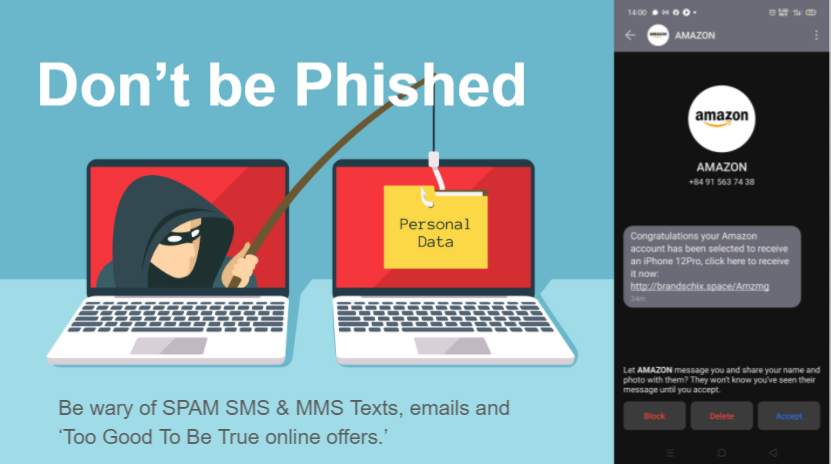
Don't Get Phished - be wary of SPAM SMS & MMS scams
Don't Get Phished

I have prepared a Google Slideshow on basic steps to protect yourself and your whanau with Cybersecurity to prevent you accounts being hacked. Check this out and update your passwords and setup 2FA today!

https://docs.google.com/presentation/d/17qLPgjkThCx1BWbw-yfk9bK7pTXWNTzaGhW96b5yQL0/edit?usp=sharing

CyberWire Daily

Latest Security Updates

If you want an entertaining look at the latest scams and hacks, listen in to the CyberWire Podcasthttps://thecyberwire.com/podcasts 

Thursday, May 6, 2021

New developments in Digital Tech

The more it changes the more it stays the same

I've taught ICT, Computing, CS, DTEC and now DTHM (Digital Technology | Hangarau Matihiko).

Whilst the names change to reflect new developments, the one thing that stays the same is you need to be a life long learner with a growth mindset.

Former SBC Computing Learning Site

https://sites.google.com/site/sbcwebsitedesign/

My Google site from St Bernard's seems very dated. I seems like a lifetime ago since I trialled Moodle and setup SBC with Google Education Suite as the Admin. They say One Internet Year = 10 years IRL and this website is cringe now because it's the old style (non-responsive) Google Site.

This blog itself is looking shabby because it hasn't been updated in a while, not since I completed the Post Grad Cert in Applied Practice (Digital & Collaborative Learning) with The Mind Lab by Unitec. 

https://themindlab.com/digital-collaborative-learning/

I really enjoyed teaching & learning at The Mind Lab by Unitec with Matt & Malcom. It was a great experience learning about 3D printing, robotics and physical computing with Arduino. Since working for the Mind Lab I have been busy teaching at HVHS. Those five years were a wonderful experience. I learnt so much, both within my large department and with the pastoral teams. 

HVHS Technology Learning Site

https://sites.google.com/hvhs.school.nz/technology
This site is the product of many years work from the whole Technology Dept (with special kudos to my colleagues Bryan, John & Katie).

In moving to the West Coast recently, my challenge is to cherry pick the best bits and localise them to suit our community here. The aim is to grow a new Digital Technology Curriculum from the ground up. This brand new Technology Department Learning site is a work in progress.
https://sites.google.com/westlandhigh.school.nz/technology 


Future Focus

https://sites.google.com/westlandhigh.school.nz/technology

I am going to update the WHS Computing Room with new equipment and am planning to introduce more 3D modelling and game development with Unity and Blender. We are currently exploring creating VR / AR (virtual and augmented reality) and robotics / drones (Microbit / LEGO / Tello) to teach Computational Thinking.

Professional Development

I am appreciating the opportunity to be a life long learner. For example the awesome DFI (Digital Fluency Intensive) course from Manaiakalani & Toki Pounamu Trust has some excellent links and resources. For example:

DFI Chrome Add-Ons and Extensions
This has many examples of Google Chrome Extensions and add-ons which will be really useful for many staff and I will be keen to share the knowledge to support our community of learning.


Future PD Goals

  • To complete EDEM626 with University of Canterbury Implementing Computational Thinking - with a focus on how I can best support our local Primary schools in the Community of Learning.
  • To continue Drone pilot training and gain Part 101 and 102.
  • To get accreditation for Google Certified Educator Level 1 & Level 2.
  • To gain Unity Certified Educator.

Monday, July 4, 2016

Agile Methodology in Education

I originally thought about teaching Agile as an effective process of project management to enable students to land projects on time. However, this blog makes me rethink the fundamentals of the content and processes of my Digital Technology projects:

http://www.opencolleges.edu.au/informed/features/agile-based-learning-what-is-it-and-how-can-it-change-education/

The blog encapsulates the student first approach through collaboraboration and rapid prototyping of fail fast and fail often to fail smart, This links in with Carol Dweck's "Growth Mindset" research of embracing setbacks as part of the iterative process of learning and improvements - rather than the fixed and static judgement of 'failure'.

Sunday, May 8, 2016

L2 & 3 Database assessments

L2 & L3 students,

Old Skool DATABASES!!!

Back in the noughties, like 2009, we taught databases using software like Excel & Access - rather than web apps in the cloud that run on PHP & MySQL. However, many of the basic fundamentals are the same, so there is still much to gain from them.

Here are the help files you will need for Databases, don't forget you will need to attend lunchtime and after-school tutorials to complete your work. Use these database links to do homework.

PHP & MySQL resources for 2.41 / 3.41

Dynamic DB driven websites with PHP / MySQL need a web server. There are options such as: 

  • https://codeanywhere.com/ - cloud based IDE
  • 000webhost.com - free hosting
  • Dreamspark Azure - free for students - ask about a serial no.
  • XAMPP - you can run local web server on your PC / Mac etc.

YouTube Video Tutorials:


Other Resources:

3 years ago, when I did the teacher PD with Andy Able from Yoobee (Natcoll) and read through their book on PHP & MySQL I was struck by the thought that it would too difficult for the average Y12/13 student and they may lose interest with the textbook / lecture format. So I put PHP/MySQL on a back burner to concentrate on teaching web dev, relational database management and programming separately.

However, having studied Blended Learning and flipped classroom models I now think that this could work really well to combine these three areas of web dev, programming and relational database management - if they are supported by good interactive resources. 

This list is by no means exhaustive - but I think these resources are more than sufficient to support teaching Y12 & Y13. I don't expect all of these will work for all of your students' preferred learning styles and I don't expect you should scare them off by tring to do all of them, however, I think combining some of them will work well.


1) Watch & Do these REALLY good Video Courses from Codeschool.com with interactive quizes (BTW these ones are FREE but you can subscribe for all courses)
ALL FREE ones: https://www.codeschool.com/free

2) Do these interactive courses on CodeCademy.com

3) Support the learning with SOLO Learn Interactive mobile learning quiz apps for iOS or Android etc

MORE INFO: 

Bucky Roberts is awesome! is Youtube channel and website The New Boston are packed with CS goodness:
PHP: https://www.thenewboston.com/videos.php?cat=11 
SQL database: https://www.thenewboston.com/videos.php?cat=49


For Online reference tutorials on PHP and MySQL check out:


FREE UDEMY COURSES:

  (you can filter your search to FREE courses)
Thorough Video based courses (passive learning):

Tuesday, March 1, 2016

Javascript Programming Posters

I found a series of programming posters on ComputingAtSchools which showed programming concepts visually with Python code and The Simpsons. I have updated these posters for my students who are learning JavaScript for Y11-Y13 via www.CodeAvengers.com.

http://tinyurl.com/js-posters

Monday, December 7, 2015

The Mind Lab by Unitec Blog: Teachers learning how to make the best use of tech...

So much Social Media to choose from... :)

The Mind Lab by Unitec Blog: Teachers learning how to make the best use of tech...: Tablets, smart phones, applications, animation and building games like Minecraft are ubiquitous in households..... but how do teachers get t...

Thursday, December 3, 2015

Activity 10: Summarising your Postgraduate Learning Journey and your planning for the future


I wrote and published an extensive answer to these criteria. For some strange reason the Blogger software timed out and my post was only saved in its draft form. I only realised this after I had made a PDF of the blog and uploaded it to the portal for marking.
Once the other work is uploaded I will rewrite this post from memory. Perhaps the learning experience is that I should write offline and copy & paste into the blog software.

The 12 Teacher's Criteria are listed here:

and are as follows:

Practising Teacher Criteria

Professional relationships and professional values
  • Criteria 1: Establish and maintain effective professional relationships focused on the learning and well-being of all ākonga.
  • Criteria 2: Demonstrate commitment to promoting the well-being of ākonga.
  • Criteria 3: Demonstrate commitment to bicultural partnership in Aotearoa / New Zealand.
  • Criteria 4: Demonstrate commitment to ongoing professional learning and development of professional personal practice.
  • Criteria 5: Show leadership that contributes to effective teaching and learning.
Professional knowledge in practice
  • Criteria 6: Conceptualise, plan, and implement an appropriate learning programme.
  • Criteria 7: Promote a collaborative, inclusive, and supportive learning environment.
  • Criteria 8: Demonstrate in practice their knowledge and understanding of how ākonga learn.
  • Criteria 9: Respond effectively to the diverse and cultural experiences and the varied strengths, interests, and needs of individuals and groups of ākonga.
  • Criteria 10: Work effectively within the bicultural context of Aotearoa NZ.
  • Criteria 11: Analyse and appropriately use assessment and information, which has been gathered formally and informally.
  • Criteria 12: Use critical inquiry and problem-solving effectively in their professional practice.

Ākonga is inclusive of all learners in the full range of settings.

Question:
Activity 10: Summarising your Postgraduate Learning Journey and your
planning for the future
Create a blog post where you reflect on your personal 32 week learning
journey through the whole postgraduate programme with regard to the 12
Practising Teacher Criteria (RTC) in e-learning . Think about which of the
criteria you have met and briefly give examples from your practice. You
can also refer to previous (DCL, LDC, R&C or APC) assessments that you
now have as evidence. Plan and justify two main goals for your future
development.

Wednesday, December 2, 2015

Activity 9: Evaluations of cultural responsiveness in practice


A koru banner I designed for SBC to reflect their commitment to multi-cultural akonga in Te Awa Kairangi,

St Bernard's College has been proactive with staff PD. This excerpt from the Strategic Plan covers diversity and inclusivity:

"Cultural Diversity St Bernard’s College is a multicultural city college comprising 15.7% Māori, 18.7% Pasifika, 14% Asian 4.1% other, 47.4% European.... 
Our Catholic character is reflected in the commitment to fostering positive cultural relationships...

The College values cultural diversity and treats all students equally and equitably. The Management Procedure on Equity Regarding Learning Programmes ensures this for students of all cultures.
The college has well established and effective whanau/parent consultation groups for Māori, Pasifika and Filipino. Tikanga Māori & Te Reo Māori The school works to support instruction in tikanga Māori and te reo Māori for full time students whose parents ask for it....
The college management procedure on Treaty Goals and Objectives ensures that the intent of the Treaty of Waitangi is fulfilled and that knowledge of and respect for Māori values are fostered."
(St Bernard's College, 2015) 

My own input:

Maori ICT poster
One of seven Bi-lingual Te Reo Maori & English ICT Vocabulary posters which I made and shared to schools across NZ via NZACDITT
I attempt to pronounce all Maori words and names correctly. I have tried to incorporate Maori and Pasifika topics into my lessons naturally. For example, when doing a project of PC systems vocabulary I research the bi-lingual equivalent and made posters of Te Reo Maori ICT vocabulary posters which I shared to all schools in New Zealand via the NZACDITT listserve email.

I helped SBC to rebrand as multicultural and inclusive with a koru pattern (see above) which symbolises our place in the Lower Hutt valley near to the rive Te Awa Kairangi and updated the website and yearbook with the koru banner and tagline Te Kura Tuarua o Hato Perenara. In the SBC school yearbook I made sure the typography would correctly include macrons in Maori words.

Gordon Walters' art lesson
using Adobe Illustrator
In terms of learning activities I attempted to promote positive cultural identity by paying homage to the artwork of kiwi artist Gordon Walters, whose work combines European modern abstract art illustration and Maori koru designs, in an Gordon Walters Adobe illustrator exercise worksheet. 

For a desktop publishing activity, I also encouraged them to make bi-lingual websites and posters with Maori proverbs (whakatauki) with English translations. The best of these posters would be printed and displayed throughout the school.

Maori pedagogy - I try to foster collaboration, team work, modelling a shared learning space where the ako can teach / learn with the teacher with respect and co-operation. I encouraged student peer review and encouraged the akonga to do project based learning for a client from their whanau or communtiy so their work will be authentic, and valued

Indigenous Knowledge - a balanced perspective?

My wife is currently studying a Postgraduate Diploma in Sustainability and Permaculture from Otago University. As a result of this she has become involved in The Epuni Food Forest project which is part of the Common Unity Project Aotearoa (CUPA). I have bceome aware of what they are doing by helping her with their social media marketing and graphic design.

The CUPA charity organises community gardens and up-cycling of resources. They also aim to improve diet and nutrition of the socio-economically deprived communities which have suffered from obesity and diabetes. This has involved teaching tamariki (children) and ako (students) from the local iwi (groups of peopleabout sustainable hortculture (or permaculture) to reconnect the school children with their parents' and grandparents' knowledge of living off the land, cooking and preparing their own food. The abundance of kai (food) created is shared through the koha (donation) kitchen. Local food businesses are encouraged to donate their short dated food which would otherwise be thtrown away. This is similar to the Garden to Table project in its aims to get students to taken an active role in the growing, preparation, cookin and most importantly eating of healthy seasonal food.

These projects are growing in popularity, however, due to economic and time pressures of the working whanau, they are not actively supported by the local parents of the Epuni school children, who are busy keeping down multiple low paid jobs. The volunteers who participate are often from outside of the community and are commonly pakeha. The aim is that the local community can get involved and gradually take control and stewardship. One of the activities is for elders in the Maori and Pasika community to teach traditional making, cooking and medicine skills. A key message of this is the herblore of indigenous plants for food and medicine. 

Whilst Western reductionist science perspective tends to ignore that which it has not studied. It may be tempting to dismiss herb lore as 'old wives' tales', however, the observed efficacy of certain plants leads them into being used in medicine. That being said, not all herbal remedies are real and efficacious.

I am skeptical of most things, including the claims of 'big Pharma' which has been shown to have a positive publication bias towards only publishing favourable peer reviews of drugs trials which skew the apparent efficacy of new medicines. This has been adroitly explained by Ben Goldacre in his book "Bad Science", (Goldacre, 2008) which on balance also warns the reader of being wary of bold (and unsubstantiated) claims from alternative medicine and homeopathy. Goldacre makes a clear case that Western science is not a complete body of knowledge but a process of checking and testing for repeatable evidence that can be tested and verified. He explains how robust experimental methods can test for significant effects to compare results against chance or the placebo effect. We should be wary of claims which are supported by the reputation of person wearing the white coat and should instead review the evidence.


It's all good...?

Richard Dawkins argues in The God Delusion that humans are 'pattern seeking' and by our very nature we try to make sense of the world. Part of this process of understanding is to create narratives and to infer cause and effect. The consequence of this is humans are (like many other creatures) susceptible to superstition, such as the post war John Frum movement 'Cargo Cults'. (Colishaw, 2015) Even pigeons have been shown to be superstitious. (Dawkins, 2006) So, we need to be aware of our our biases and temptations to make mental shortcuts or lazy thinking.

For example, I am aware of the popular dichotomy of Western World view vs Indigenous World view. It is clear that the free market capitalist system is a major contributing factor in climate change and environmental damage. However, we should be wary of painting a black and white image of one good / one bad. It is a popular idea to recognise Maori guardianship and conservation of the land (tangata) with a concept called Kaitiakitanga.

It is also a popular trope to think of the sins of the modern world as being new. It would be a mistake think that the grass was always greener in 'The Good Old days'. We should be wary of viewing (reconstructed) history with rose tinted spectacles. For example, whilst we can recognise the abhorent treatment of African slaves in the industrial revolution, and recognise the many abuses of colonialism, we should not consider slavery to be unique to Western 'civilisation'. Nor should we imagine that just because knowledge was indigenous that it was all better and all 'in balance' with nature. For example, it has been claimed that in Aotearoa, the indigenous moa were hunted to extinction by the Maori tribes 600 years ago. (Morell, 2014). It would also be a mistake to imagine that before colonialism all indigenous peoples lived in peace. This would be to ignore evidence inter tribal warfare. (Te Ara, 2015)

However, please do not take the observations above as a sign that I am disrespectful of Maori custom and tradition. I am aware of my responsibilities to the Treaty of Waitangi and the bi-cultural nature of New Zealand Aotearoa. I am aware of Kaupapa Maori and Te Noho Kotahitanga 

"The elements of Te Noho Kotahitanga are:


Rangatiratanga : Authority and Responsibility


Wakaritenga : Legitimacy


Kaitiakitanga : Guardianship


Mahi Kotahitanga : Co-operation


Ngākau Māhaki : Respect"

(Keelan J, 2015)


References:
Colishaw, S. April 19 2015. Vanuatu Cargo Cults see cyclone aid as a sign. Retrieved from http://www.stuff.co.nz/world/south-pacific/67729752/Vanuatu-cargo-cults-see-cyclone-aid-as-a-sign Common Unity Project Aotearoa, November 2015. Retreived from http://www.commonunityproject.org.nz/
Dawkins, R. (2006). The God delusion. Boston: Houghton Mifflin Co..Epuni Food Forest, retreived from https://www.facebook.com/epunifoodforest/  
Goldacre, B. 2008. Bad Science. Published by Fourth Estate, UK. Retreived from https://en.wikipedia.org/wiki/Bad_Science_(book)
Kaupapa Maori, 2015. Retrieved from http://www.kaupapamaori.com/theory/5/
Keelan, J. Teaching and Te Noho Kotahitanga. Unitec wiki.spaces Retrieved from 
Morell, V. March 17, 2014. Why did New Zealand's moas go extinct? Retieved from http://news.sciencemag.org/biology/2014/03/why-did-new-zealands-moas-go-extinct
St Bernard's College. 2015. Strategic Plan. Retrieved from http://www.sbc.school.nz/2015-Mailout/strategic-plan-2015-preparation-comm-cons-vers.pdf
Te Ara, The Online Encyclopedia of New Zealand. Kaitiakitanga. Retrieved from http://www.teara.govt.nz/en/kaitiakitanga-guardianship-and-conservation 
Te Ara, The Online Encyclopedia of New Zealand. Pre-European Society. Retrieved http://www.teara.govt.nz/en/maori/page-2

Activity 9: Evaluations of cultural responsiveness in practice

Create a blog post where you share your own views on your indigenous
knowledge and culturally responsive pedagogy and then evaluate how you
or your school addresses cultural responsiveness in practice in two of the
following areas:
● vision, mission, and core values
● policies,
● goals,
● communication methods,
● decision-making,
● planning and assessment,
● learning activities,
● school-wide activities,
● resources