Tuesday, May 25, 2021

DFI - Week 3 -- Media

  • What did I learn that increased my understanding of Manaiakalani kaupapa and pedagogy?


    The Hook 

    SISOMO book cover

    I bought a copy of the SISIMO book by Saatchi & Saatchi about 8 years a ago. I do think we risk burn out if we try to compete with the eye candy of AAA game / $m budget Hollywood production standards. But I agree that good design is key and sight, sound, motion gather students' attention.
    The other maxim is K.I.S.S. keep it super simple.

        Thinking with Hands

I often say to students that I want them to listen with their eyes, because it focusses their attention and reinforces learning to have multi-modal, multi-sensory learning. In the last few Digital Technology Hangarau Matihiko classes I've been using digital tools of Trello.com to make project management KANBAN boards and Coggle.it to may shareable mind maps. However, a good supple of post-it notes, marker pens and big pieces of paper would be better for an immediate hands-on result. 

  • What did I learn that could improve my confidence, capability or workflow as a professional? 
    YouTube Playlists in Google Sites:
    As a workflow I pick specific videos and tutorials to add to my Google Learning Site and arrange them, e.g. 2 columns, 3 columns or grid of 4 videos. This can be time-consuming so using Youtube Playlists would be potentially quicker. However, I like making the sequence of videos explicitly clear. I see that you can sort the order of the playlist by date, popularity etc, but there doesn't seem to be a bespoke option. E.g. I may wish to change the order to support proximal learning of topics. 

  • What did I learn that could be used with my learners?  
    2D & 3D Planning

    I think the basic shapes and drawing tools in Google Slides and Google Drawing will be useful for my Seniors who have to plan their 3D VR apps. This could be an easy way for them to pre-visual a bird's eye view of their 3D space.

    Smart marking


    I have also been thinking about easy ways to create drag and drop exercises and quizzes. I already know how to use Slides & PPT and self-marking Google Forms. However, when I sat the Google Educator exam I liked how they had drag and drop quiz items that also self-marked. So I will look into making some of these, perhaps for my Computational Thinking course.

  • What did I learn that could improve my confidence, capability or workflow in my personal life? I will revisit using Screencastify and editing with weVideo. I have previous experience with non-linear video with my degree in Digital Media. I am familiar with iMovie and Adobe CC apps. I do suffer from procrastination / perfection bias as I only want to publish polished videos to a high standard. Also it seems daft to reinvent the wheel if a professional Youtuber has already spent hundreds of hours creating an animated After Effects video on a topic. This inertia means I haven't yet created my series of self-published re-windable video tutorials ( like a Coursera or Udemy course). I think this would be a personal goal to create some high level original content

Thursday, May 13, 2021

DFI Week 2 - Meetup Recording Exercise & Reflection

Intro

Ray and I reviewed two students' blogs and recorded our Google Meetups to post here. This isn't polished and is unedited. 

Video 1


Video 2


Useful Links:

https://docs.google.com/presentation/d/1H9Y8ougnegvrzQASuW3ij0v8yJ0kVl7M5Y_8FYeiDLE/edit?usp=sharing

Reflection Questions

Blogging - Embedding Video in Blogs: Makaore

Embedding a video in a blog (in te reo)


Time to reflect and share with colleagues

  • What did I learn that increased my understanding of Manaiakalani kaupapa and pedagogy? I had previously read the slide deck on Manaiakalani's history and background and I enjoyed speaking with Dorothy when she visited my school.

  • What did I learn that could improve my confidence, capability or workflow as a professional? Bookmarks / Tabs - nested folders to store them in folders when I have a class set of websites / portfolios - this would be handy rather than having to go back into Code.org dashboard to navigate between them. Also to group and catagorise.

  • What did I learn that could be used with my learners?  Encouraged to use Hangouts to record rewindable learning content (rather than Screencastify / Loom) 

  • What did I learn that could improve my confidence, capability or workflow in my personal life? On Wednesday morning I sat the Google Cert Ed Exam before school. I liked how the questions had interactive movable definition / answer and think I will try to make these as opposed to using Google Forms


Wednesday, May 12, 2021

CyberSafety

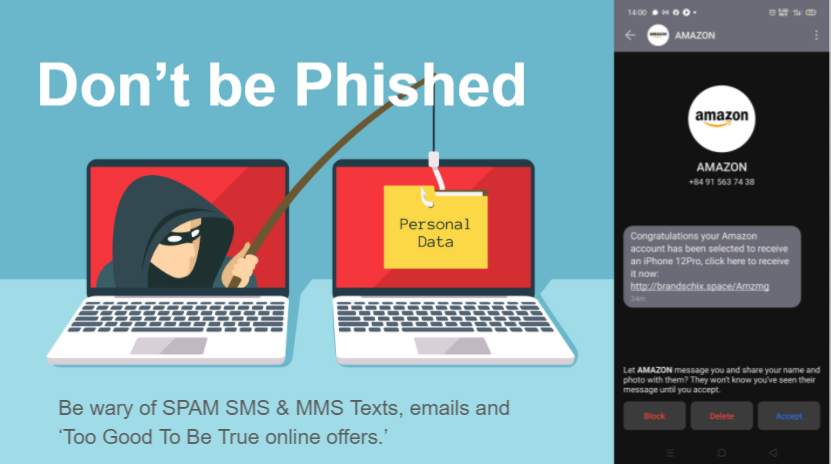
Don't Get Phished - be wary of SPAM SMS & MMS scams
Don't Get Phished

I have prepared a Google Slideshow on basic steps to protect yourself and your whanau with Cybersecurity to prevent you accounts being hacked. Check this out and update your passwords and setup 2FA today!

https://docs.google.com/presentation/d/17qLPgjkThCx1BWbw-yfk9bK7pTXWNTzaGhW96b5yQL0/edit?usp=sharing

CyberWire Daily

Latest Security Updates

If you want an entertaining look at the latest scams and hacks, listen in to the CyberWire Podcasthttps://thecyberwire.com/podcasts 

Thursday, May 6, 2021

New developments in Digital Tech

The more it changes the more it stays the same

I've taught ICT, Computing, CS, DTEC and now DTHM (Digital Technology | Hangarau Matihiko).

Whilst the names change to reflect new developments, the one thing that stays the same is you need to be a life long learner with a growth mindset.

Former SBC Computing Learning Site

https://sites.google.com/site/sbcwebsitedesign/

My Google site from St Bernard's seems very dated. I seems like a lifetime ago since I trialled Moodle and setup SBC with Google Education Suite as the Admin. They say One Internet Year = 10 years IRL and this website is cringe now because it's the old style (non-responsive) Google Site.

This blog itself is looking shabby because it hasn't been updated in a while, not since I completed the Post Grad Cert in Applied Practice (Digital & Collaborative Learning) with The Mind Lab by Unitec. 

https://themindlab.com/digital-collaborative-learning/

I really enjoyed teaching & learning at The Mind Lab by Unitec with Matt & Malcom. It was a great experience learning about 3D printing, robotics and physical computing with Arduino. Since working for the Mind Lab I have been busy teaching at HVHS. Those five years were a wonderful experience. I learnt so much, both within my large department and with the pastoral teams. 

HVHS Technology Learning Site

https://sites.google.com/hvhs.school.nz/technology
This site is the product of many years work from the whole Technology Dept (with special kudos to my colleagues Bryan, John & Katie).

In moving to the West Coast recently, my challenge is to cherry pick the best bits and localise them to suit our community here. The aim is to grow a new Digital Technology Curriculum from the ground up. This brand new Technology Department Learning site is a work in progress.
https://sites.google.com/westlandhigh.school.nz/technology 


Future Focus

https://sites.google.com/westlandhigh.school.nz/technology

I am going to update the WHS Computing Room with new equipment and am planning to introduce more 3D modelling and game development with Unity and Blender. We are currently exploring creating VR / AR (virtual and augmented reality) and robotics / drones (Microbit / LEGO / Tello) to teach Computational Thinking.

Professional Development

I am appreciating the opportunity to be a life long learner. For example the awesome DFI (Digital Fluency Intensive) course from Manaiakalani & Toki Pounamu Trust has some excellent links and resources. For example:

DFI Chrome Add-Ons and Extensions
This has many examples of Google Chrome Extensions and add-ons which will be really useful for many staff and I will be keen to share the knowledge to support our community of learning.


Future PD Goals

  • To complete EDEM626 with University of Canterbury Implementing Computational Thinking - with a focus on how I can best support our local Primary schools in the Community of Learning.
  • To continue Drone pilot training and gain Part 101 and 102.
  • To get accreditation for Google Certified Educator Level 1 & Level 2.
  • To gain Unity Certified Educator.

Monday, July 4, 2016

Agile Methodology in Education

I originally thought about teaching Agile as an effective process of project management to enable students to land projects on time. However, this blog makes me rethink the fundamentals of the content and processes of my Digital Technology projects:

http://www.opencolleges.edu.au/informed/features/agile-based-learning-what-is-it-and-how-can-it-change-education/

The blog encapsulates the student first approach through collaboraboration and rapid prototyping of fail fast and fail often to fail smart, This links in with Carol Dweck's "Growth Mindset" research of embracing setbacks as part of the iterative process of learning and improvements - rather than the fixed and static judgement of 'failure'.

Sunday, May 8, 2016

L2 & 3 Database assessments

L2 & L3 students,

Old Skool DATABASES!!!

Back in the noughties, like 2009, we taught databases using software like Excel & Access - rather than web apps in the cloud that run on PHP & MySQL. However, many of the basic fundamentals are the same, so there is still much to gain from them.

Here are the help files you will need for Databases, don't forget you will need to attend lunchtime and after-school tutorials to complete your work. Use these database links to do homework.

PHP & MySQL resources for 2.41 / 3.41

Dynamic DB driven websites with PHP / MySQL need a web server. There are options such as: 

  • https://codeanywhere.com/ - cloud based IDE
  • 000webhost.com - free hosting
  • Dreamspark Azure - free for students - ask about a serial no.
  • XAMPP - you can run local web server on your PC / Mac etc.

YouTube Video Tutorials:


Other Resources:

3 years ago, when I did the teacher PD with Andy Able from Yoobee (Natcoll) and read through their book on PHP & MySQL I was struck by the thought that it would too difficult for the average Y12/13 student and they may lose interest with the textbook / lecture format. So I put PHP/MySQL on a back burner to concentrate on teaching web dev, relational database management and programming separately.

However, having studied Blended Learning and flipped classroom models I now think that this could work really well to combine these three areas of web dev, programming and relational database management - if they are supported by good interactive resources. 

This list is by no means exhaustive - but I think these resources are more than sufficient to support teaching Y12 & Y13. I don't expect all of these will work for all of your students' preferred learning styles and I don't expect you should scare them off by tring to do all of them, however, I think combining some of them will work well.


1) Watch & Do these REALLY good Video Courses from Codeschool.com with interactive quizes (BTW these ones are FREE but you can subscribe for all courses)
ALL FREE ones: https://www.codeschool.com/free

2) Do these interactive courses on CodeCademy.com

3) Support the learning with SOLO Learn Interactive mobile learning quiz apps for iOS or Android etc

MORE INFO: 

Bucky Roberts is awesome! is Youtube channel and website The New Boston are packed with CS goodness:
PHP: https://www.thenewboston.com/videos.php?cat=11 
SQL database: https://www.thenewboston.com/videos.php?cat=49


For Online reference tutorials on PHP and MySQL check out:


FREE UDEMY COURSES:

  (you can filter your search to FREE courses)
Thorough Video based courses (passive learning):